
 Download Now
Why Professional Screen Time Exceeds Task Requirements: The Hidden Mechanisms Behind 6.75+ Hours Daily
The State of Human Attention 2026 reveals that legal, consulting, and finance professionals spend 6.75 hours daily on screens. What the data masks is a critical distinction: a legitimate 4-hour workload rarely translates into 4 hours on screen in these roles. Something else fills the gap.
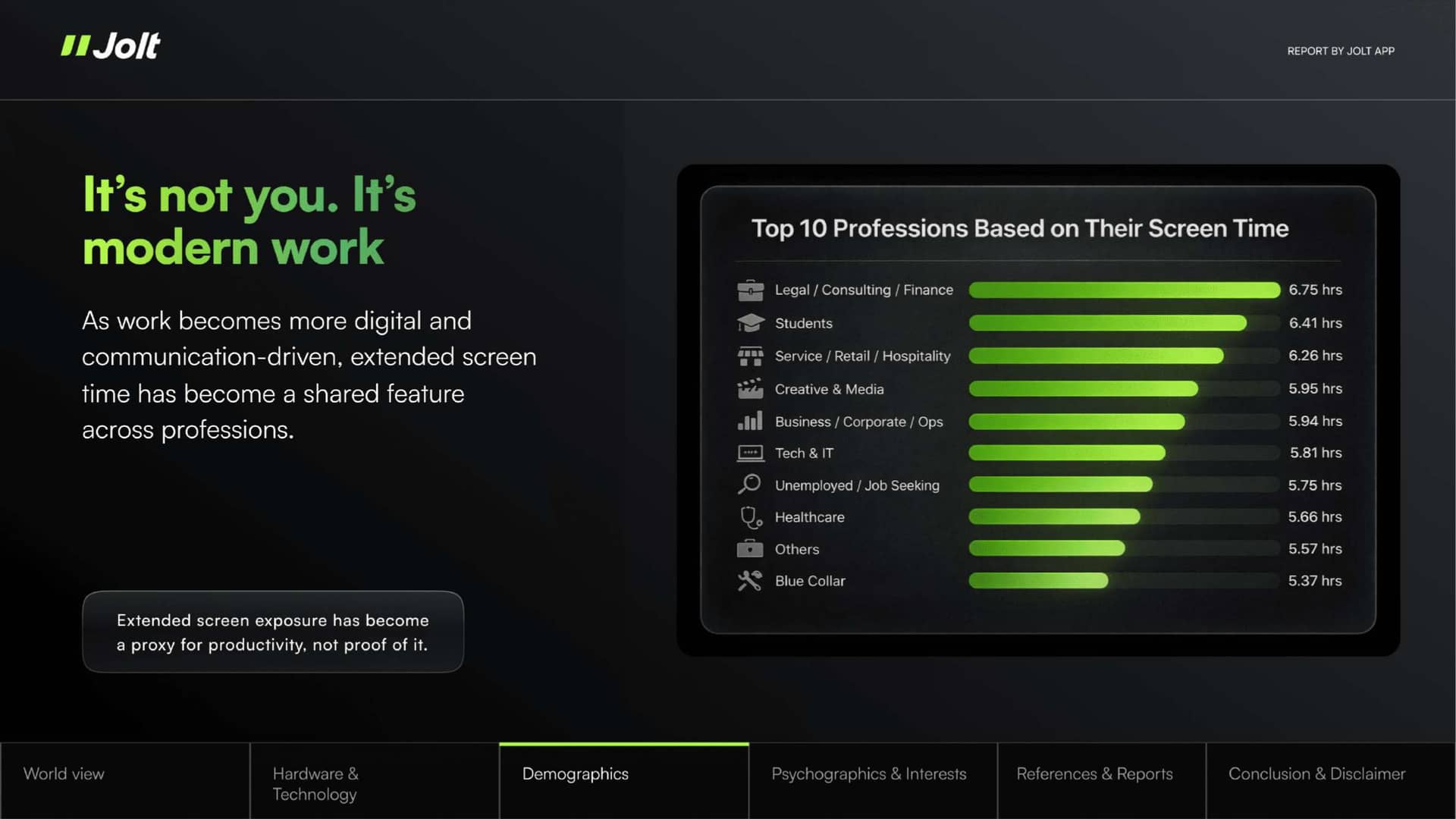
Multiple mechanisms hidden within work structure inflate actual time beyond task requirements.
How Task Switching Inflates Screen Time: The Attention Residue Problem
When a consultant moves from one client project to a second, then to a third, cognitive fragments of the first project remain active.
Researchers call this attention residue. The mind does not cleanly transfer focus; it splits between old and new work. This split reduces performance on the current task.
The impact is substantial.
Professor Sohie Leroy from the University of Washington demonstrates that attention residue reduces productivity by up to 40% per task switch. Recovery to full focus takes 15 to 23 minutes per transition.
In a day where a consultant makes 8 to 10 project switches, attention residue accumulates. Tasks that should take 45 minutes stretch to 60 or 75 minutes because cognitive efficiency degrades incrementally with each shift.
Critically, this extended time happens on screen.
The consultant is visibly working, responding to communications, managing files. But the work is slower because the mind is still partially attached to the previous project.
Screen presence is real. Task progress is marginal.
The 6.75-hour baseline includes substantial time that represents recovery from attention residue, not efficient task completion.
This mechanism explains why communication-heavy roles show the highest screen exposure.
A lawyer managing three active cases, a consultant juggling multiple client timelines, a financial analyst tracking multiple portfolios.
Each project switch costs not just attention but time. Over a full day, these costs accumulate into the elevated screen baseline observed across these professions.
When Recovery Time Becomes Screen Time: The Interruption Cascade
Beyond attention residue sits a deeper structural issue: the interruption cascade. Research from UC Irvine tracked how interruptions actually unfold.
The average office worker completes a task for only 12 minutes before an interruption disrupts focus. After the interruption ends, they do not immediately return to the original task.
Instead, 25 minutes pass before they resume. During that 25-minute recovery window, most activity occurs on screen: opening files, reviewing context, checking emails for task-relevant information.
In high-screen professions, these cycles repeat relentlessly. A financial analyst faces constant market alerts and client messages.
Each interruption derails focus. Recovery requires screen time: re-establishing context, reopening tools, reviewing notes.
The analyst's 6.75 hours on screen includes substantial recovery time that is structurally necessary but not efficiently productive.
The consequence is compounding. Each interruption generates attention residue, which lengthens recovery, which creates vulnerability to further interruption.
Screen time expands not because tasks grew more demanding, but because the work environment makes sustained focus nearly impossible.
Professionals remain on screens for hours that represent recovery and re-engagement, not substantive progress.
The Communication Backlog Cycle: Notification Fatigue
Communication platforms create continuous streams of incoming signals.
Slack messages, email alerts, calendar notifications, task assignments. Over 50% of workers in high-communication roles report feeling pressure to respond immediately.
Each notification creates a choice: act now or defer. The cognitive cost of making that choice, repeatedly, throughout the day, is invisible but substantial.
Research shows that frequent notifications increase cognitive load by 37% and reduce task completion efficiency by 28%.
Professionals working in these roles experience message fatigue: a state where perceived over-exposure and redundancy in incoming communication creates motivation collapse. They remain on screens longer trying to manage the backlog, even though extended presence does not increase output.
A consulting team tracking a complex project across different communication platforms faces constant re-prioritization.
The screen time required to manage notifications and decision-making exceed the hours required to complete deliverables. The 6.75-hour baseline includes hours spent managing the communication environment itself, not the actual work.
What This Distinction Actually Matters For
These mechanisms collectively explain why professionals work longer on screens despite no corresponding increase in task complexity.
It is a structural outcome of work environments that prioritize communication responsiveness, distribute attention across simultaneous projects, and treat screen presence as a proxy for productivity.
Attention residue, interruption cascades, and notification fatigue collectively extend screen time far beyond what tasks actually require.
This distinction matters profoundly.
If screen time resulted from legitimate task demands, reducing it would undermine work output. But if screen time is artificially inflated by cognitive mechanisms that worsen productivity even while extending presence, then reducing it could improve both attention and outcomes.
The State of Human Attention data suggests this possibility deserves serious attention from leaders and organizations designing work structures and communication norms.
Your screen time won't fix itself.
Jolt blocks the apps, protects your sleep, and keeps you accountable. Free to start.
 Take charge of your time