Screen Time Burnout: What Is It & How To Recover When Screen Overuse Drains Productivity
If you're finishing each workday mentally exhausted despite not completing your most important tasks, you're likely experiencing screen time burnout at work.
Screen time burnout happens when prolonged digital exposure depletes your cognitive resources. It especially affects knowledge workers and office professionals, and most people don't realize excessive screen time is the culprit until burnout becomes severe.
What Is Screen Time Burnout?
Screen time burnout is more than feeling tired after a long day at the computer. It's exhaustion from continuous digital engagement caused by extended screen exposure.
Your brain isn't designed for constant digital stimulation. Each notification, email, or app switch creates a small mental cost. These accumulate throughout the day, draining your mental energy.
How Screen Time Burnout Silently Kills Your Productivity
The irony of screen time burnout is that you feel busy while accomplishing less. This happens because of cognitive residue, where your mind partially remains focused on a previous task even after switching to a new one.
When you jump between email, messaging apps, project tools, and work documents, you're forcing your brain to repeatedly reset itself. Excessive app-switching reduces focus time by 40% and increases error rates by 30%.
Your brain needs ~15-25 minutes to re-engage with a complex task after an interruption. If you're switching apps every 5-10 minutes, you're never reaching true focus but an illusion of productivity.
Decision fatigue compounds this problem. Every digital interaction requires a small decision: reply now or later? Check this notification or ignore it? These countless small decisions deplete your decision-making capacity, which is why your best thinking happens early in the workday.
Early Warning Signs To Catch Burnout Before It Takes Over
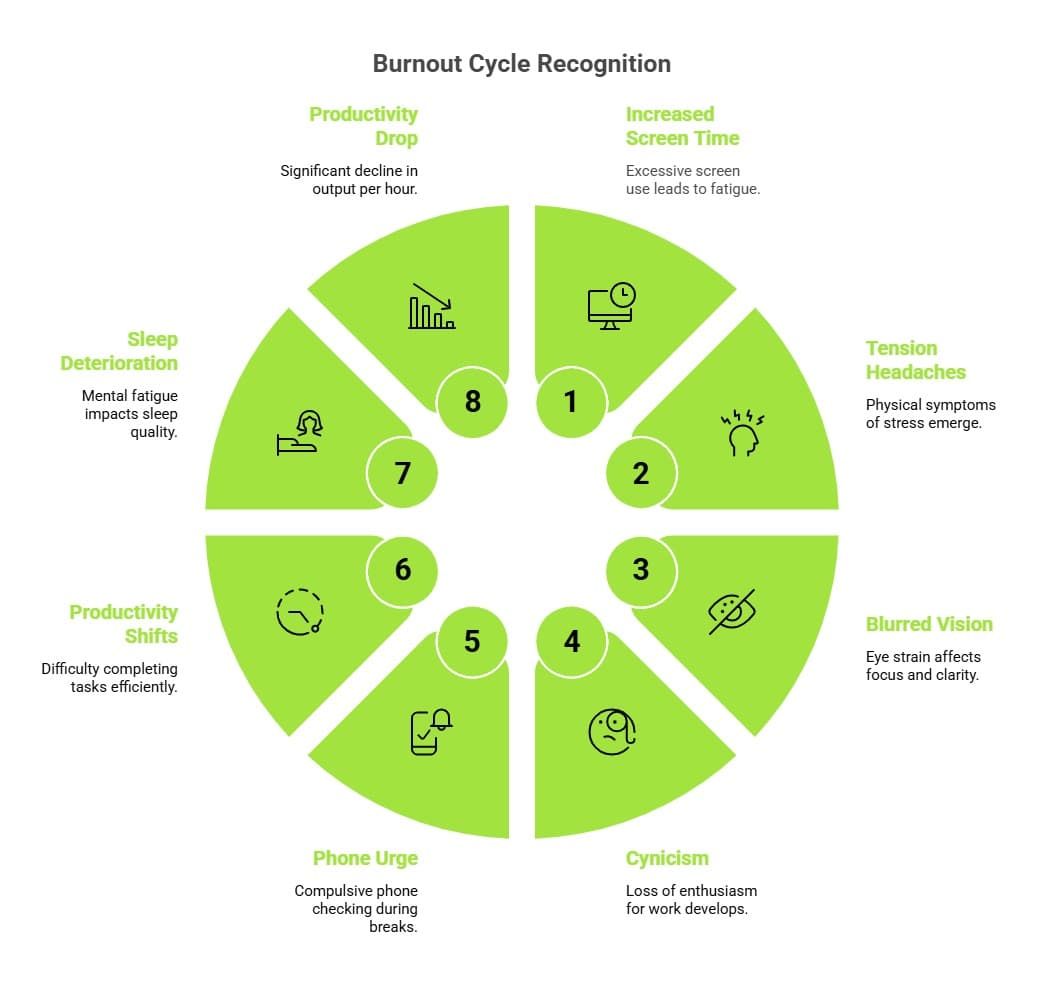
Screen time burnout creeps in through measurable signs most professionals miss. Recognizing these early indicators lets you intervene before full burnout sets in. Here are the key indicators to watch:
- Daily screen time exceeds 8 hours with a 20-30% drop in task completion compared to your normal pace.
- Persistent tension headaches at the end of your workday.
- Blurred vision after screen use or difficulty shifting focus between tasks.
- Feeling cynical about work that once energized you.
- Overwhelming urge to check your phone during breaks.
- Shifts in productivity patterns: starting tasks but struggling to complete them (spending 4 hours on 1-hour work).
- Sleep quality deteriorating from mental fatigue (How Screen Time Before Bed Affects Your Sleep).
- Productivity level drops over 25% as the output per hour declines significantly.
The most reliable way to detect burnout before it becomes exhausting is through monitoring daily screen time, app usage, and task completion rates.
Break the Cycle: Science-Backed Recovery Strategies That Actually Work
Recovery from screen time burnout requires reducing screen time and restructuring how you use it. The goal isn't eliminating digital work, it's making your digital work sustainable. Here’s how you can start your recovery journey:
Reframe your digital boundaries
Stop viewing screen time limits as restrictions and view them as protection for your attention. Research suggests 6 hours of focused work-related screen time maintains cognitive performance, while 7+ hours triggers measurable decline.
So, if you work 8 hours, aim for one hour screen-free (in-person calls, meetings, or genuine breaks).
Implement structured breaks
The 90-minute ultradian rhythm is 90 minutes of focused work followed by a 15-20 minute break away from screens.
During this break, step outside, do light movement, or practice brief meditation to restore focus.
Batch your app engagement
Instead of responding to notifications constantly, designate specific times to check email (9 AM, 12 PM, 3 PM) and messaging apps. This change reduces daily context switches by 60-70%, directly improving focus quality.
Session-based app limiting by tools like Jolt can enforce this structure automatically, removing the willpower requirement.
Managing screen time burnout requires visibility into your patterns plus tools like
Jolt which support boundary enforcement.
- Jolt’s app-level ‘Duration Limits’ caps how long you spend in specific apps daily.
- Its ‘Open Limit’ restricts how many times per day you can open an app, which works especially well for attention-fragmenting platforms.
- Session-based blocking lets you create preset work sessions tailored to your requirement, you eliminate the friction of deciding which apps to use when and save decision energy for actual work.
- Alongside, progress tracking (‘Insights’) transforms abstract goals into concrete feedback as they help you catch productivity rebounds in real time, motivating continued adherence to healthier digital habits.
Screen Time Burnout Recovery Starts With Intentional Digital Boundaries
Screen time burnout is reversible, but recovery requires deliberate action. The gap between awareness and action is where most people get stuck.
You now understand the problem, the mechanisms driving it, and the specific solutions that work. What remains is implementation.
Start with one change this week: reduce your maximum daily screen time by 1 hour or implement one focused session where non-essential notifications are blocked. Track this change for 5 days.
From there, incrementally layer in structured breaks, app batching, and limit-based sessions until you rebuild sustainable productivity.
Knowledge workers thriving in today's digital environment aren't those with the strongest willpower. They're the ones with systems making good choices automatic.
Frequently Asked Questions
- What is screen time burnout at work?
Screen time burnout is cognitive exhaustion from prolonged digital exposure that depletes decision-making ability and fragments focus through constant app-switching.
- How does excessive screen time affect productivity?
Excessive screen time reduces focus by 40%, increases errors by 30%, and weakens afternoon productivity through constant app-switching.
- What are early warning signs of screen time burnout?
Watch for 20-30% productivity decline, persistent headaches, blurred vision, emotional cynicism, sleep issues, and output per hour dropping over 25%.
- How many hours of screen time per day is safe?
6 hours of focused work-related screen time maintains performance. Beyond 7 hours causes measurable decline.
- Can screen time burnout be reversed?
Yes, burnout is reversible with deliberate action. Start by reducing screen time by 1 hour or implementing focused sessions.
- What is cognitive residue and its impact on burnout?
Cognitive residue occurs when your mind remains on previous tasks after app-switching. Frequent switches fragment focus and accelerate burnout.
- How does session-based app limiting prevent burnout?
Session-based blocking creates preset work structures, eliminating decision friction. This reduces context switches by 60-70%, improving focus quality.

 Download Now
 Take charge of your time