
 Download Now
The best screen time apps for iPhone in 2026
Six apps worth your time, what each one actually does, what it costs, and who it's for. Prices and ratings are public, as of September 2026.
 Try Jolt free
If you want to actually change the habit, Jolt is our pick for hard blocks plus a real accountability partner. Want free? ScreenZen or Apple's built-in Screen Time. Live on a Mac too? Freedom. Want a polished focus app? Opal. Want the gentlest nudge? one sec.
Jolt
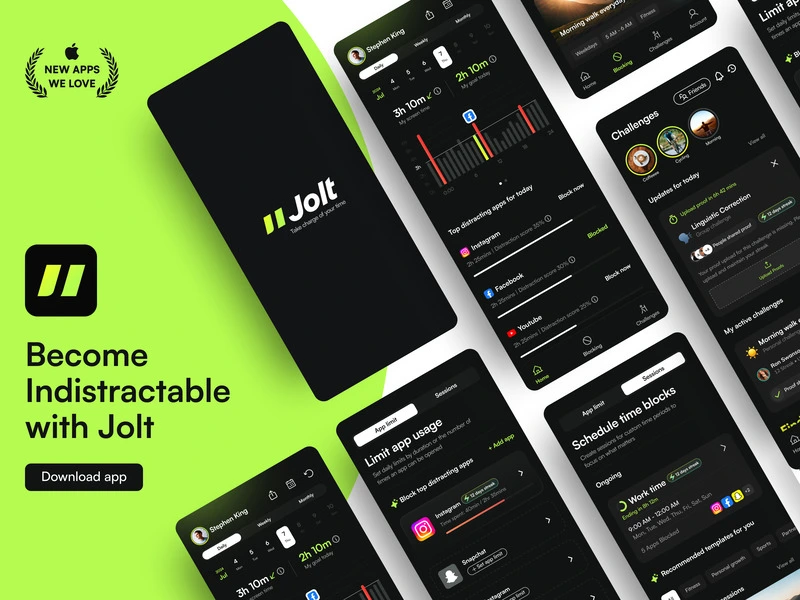
Best for building the habitiOS · 4.9 ★ · from $45/yrJolt treats screen time as a behavior problem, not a timer problem. Blocks are hard to tap past, a 1:1 accountability partner sees when you slip, and sleep protection guards your nights. It's the most hands-on of the group, priced mid-pack at $45/yr.
Opal
Best polished iOS focus appiOS + Mac · 4.7 ★ (~87K) · from $19.99/moThe established premium name. Scheduled focus sessions, a Focus Score, and a clean Mac app. Its toughest anti-bypass mode is Pro-only, but on Apple hardware it's hard to fault.
one sec
Best research-backed nudgeiOS · 4.8 ★ (~23K) · from $2.99/moMakes you take a breath before an app opens. A Max Planck study behind it reports a big drop in opens. Gentle by design, so it's a nudge more than a wall, and the free tier only covers one app.
ScreenZen
Best free optioniOS + desktop · 4.8 ★ · freeGenuinely free, no paid tier. Pause screens, escalating delays that grow the more you open an app, and daily limits. A small donation-funded team, so fixes can be slow and website blocking is a bit inconsistent, but you can't beat the price.
Freedom
Best for cross-device blockingiOS + desktop · 4.4 ★ · from $8.99/moThe one to pick if your distractions are spread across a laptop and a phone. Build a blocklist, hit go, and it blocks everywhere at once. Sync can be fussy and it's all-or-nothing per site, but nothing else here covers desktop this well.
Apple Screen Time
Best free baselineBuilt into iOS · freeAlready on your phone. A solid usage dashboard, App Limits, and Downtime schedules, and iOS 26 closed some of the old loopholes. It won't hold a determined adult to a block or offer accountability, but as a free starting point it's fine.
The short version, side by side
| App | Platforms | Free tier | From | Rating | Best for |
|---|---|---|---|---|---|
| Jolt | iOS | Yes | $45/yr | 4.9 | Changing the habit |
| Opal | iOS + Mac | Yes | $19.99/mo | 4.7 | Polished iOS focus |
| one sec | iOS | Yes | $2.99/mo | 4.8 | Gentle, research-backed |
| ScreenZen | iOS + desktop | Free | $0 | 4.8 | Free friction blocking |
| Freedom | iOS + desktop | Yes | $8.99/mo | 4.4 | Cross-device blocking |
| Apple Screen Time | iOS built-in | Free | $0 | — | Free baseline |
How to pick
You keep beating your own limits
If you tap past every soft nudge, you need enforcement and a person watching. That's Jolt, or Freedom if the problem is mostly on a laptop.
You want to spend nothing
Start with Apple Screen Time or ScreenZen. Both are free. If free isn't holding you, that's usually the sign you need enforcement.
You just want to be more mindful
one sec's breathe-before-you-open pause is the gentlest way in, and the cheapest paid option on this list.
Questions people ask
What's the best screen time app for iPhone in 2026?+−
It depends on how much willpower you're trying to replace. For hard enforcement plus accountability, Jolt. For a free start, Apple Screen Time or ScreenZen. For desktop plus phone, Freedom. For a gentle nudge, one sec.
Is there a good free screen time app?+−
Yes. ScreenZen is fully free with no paid tier, and Apple's built-in Screen Time costs nothing. Paid apps add stronger enforcement, accountability, and better insights.
Which screen time app is hardest to bypass?+−
Apps built around real enforcement, like Jolt, plus physical options like Brick, are the hardest to cheat. Free and friction-only tools are the easiest to tap past.
Tried the free ones and still scrolling?
That's the sign you need enforcement, not another tracker. Jolt blocks the apps, protects your sleep, and keeps you accountable. Free to start.
Keep comparing
Comparison maintained by the Jolt team. Pricing and ratings from public App Store and vendor sources, as of September 2026.
 Take charge of your time