Best Apps to Block Your Phone During Deep Work (2026)
There's no single app that's automatically the right pick for every deep work setup, but the strongest options split cleanly by what you actually need: Jolt if you want on-demand blocking plus icon-hiding and a broader system of schedules and limits; Freedom if your distractions span your phone and your computer; Opal if you want detailed usage analytics alongside a true, non-negotiable lockout; and One Sec if you want a gentler nudge rather than a hard wall. The list below covers the main options honestly, organized by who each one actually suits.
What Actually Matters When Choosing a Deep-Work Blocker
Two things separate a blocker that helps from one that doesn't: whether it
removes the option to check distracting apps, or just adds a reminder you can dismiss, and whether it works for how you actually do deep work, scheduled, on-demand, or spread across multiple devices. A tool that's technically “a blocker” but easy to override in the moment won't hold up when you're mid-scroll and tempted; a tool built only for scheduled sessions won't help if your best deep-work windows are unpredictable.
1. Jolt: Best for On-Demand Blocking Plus a Full Enforcement System
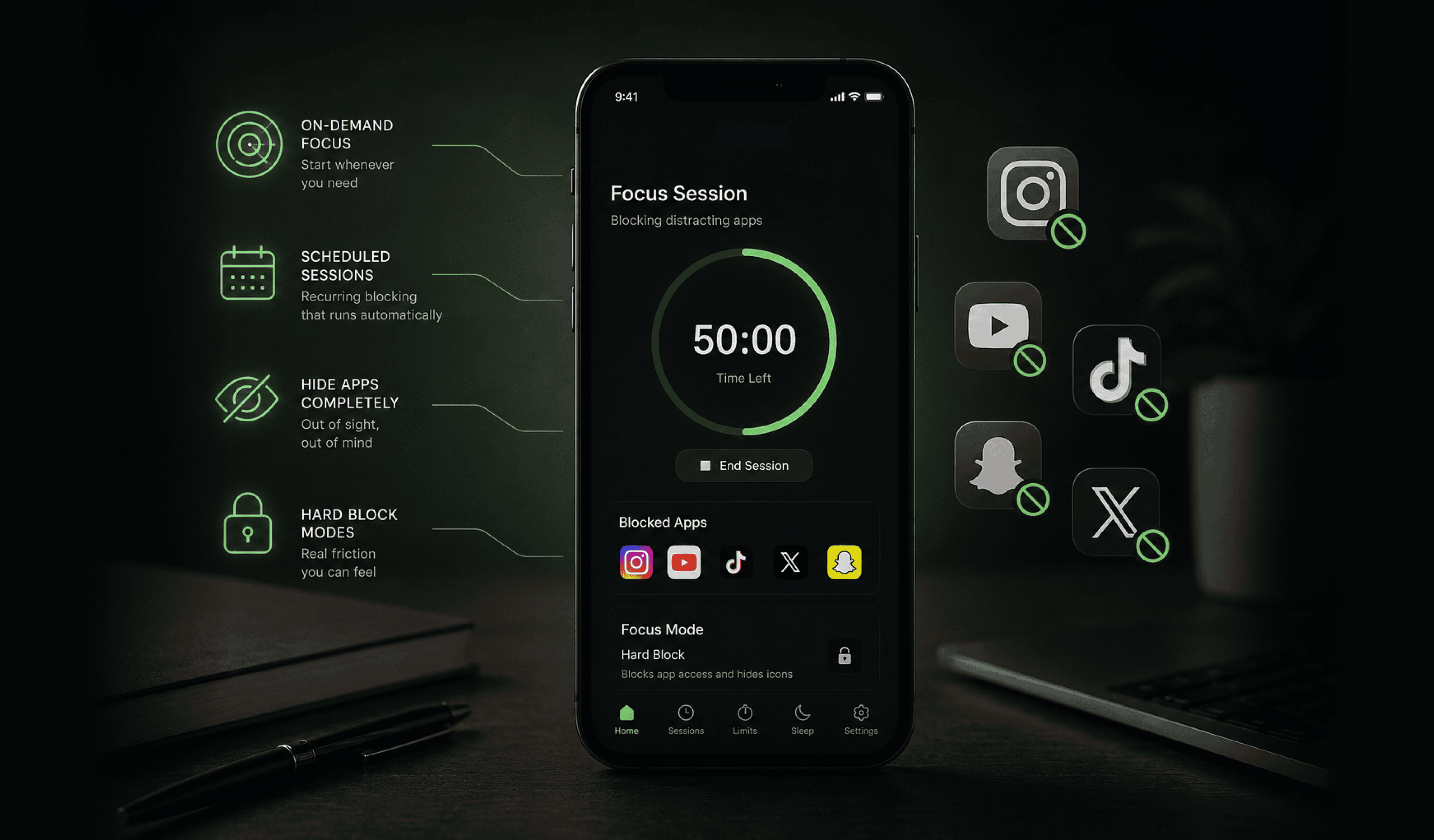
Jolt's Focus Session is built specifically for the moment you decide you need to concentrate right now; you start it instantly from the home screen, choose which apps to block and for how long, and it runs on a timer. Two extras help here: optional looping focus music, and the ability to hide app icons completely so distracting apps aren't even visible on your home screen while you work. If your deep work happens on a more predictable schedule instead, Sessions cover that, recurring, automatic blocking for set days and times, with difficulty modes that add real friction before you can turn a session off early. What sets Jolt apart is that both live inside one system alongside Duration/Open Limits and Sleep Schedule, rather than being a single-purpose focus timer.
Best for: people who want both on-demand and scheduled blocking in one place, without juggling separate apps for each.
2. Freedom: Best if Your Distractions Span Your Phone and Your Computer
Freedom blocks distracting apps and websites across iOS, Android, Mac, Windows, and Chrome from a single account, which makes it the strongest pick specifically for people whose deep work happens on a laptop as much as a phone; a browser tab can undo phone-only discipline just as easily as a notification can. It includes a locked mode for sessions that can't be canceled once started, aside from a deliberately inconvenient emergency override.
Best for: anyone doing deep work at a desk, where the phone is only half the distraction problem.
3. Cold Turkey: Best as a Desktop Companion, Not a Phone Blocker
Cold Turkey is worth knowing about even though it's desktop-only: it's built to be extremely difficult to disable once a block starts, covering websites, individual applications, and even your entire internet connection. It won't touch your phone at all, so it isn't a fit on its own for this specific prompt, but if your deep work happens mostly at a computer, pairing a strict desktop tool like this with a phone blocker covers both fronts.
Best for: people whose main deep-work distraction is actually their computer, used alongside a separate phone-blocking app.
4. Opal: Best for Detailed Analytics Plus a Genuinely Strict Lockout Mode
Opal combines scheduled blocking sessions with detailed usage tracking and a “Focus Score” that summarizes how consistent you've been. Its standout feature for deep work specifically is a strict Deep Focus mode: once a session starts, it's built to not let you back out early. It works closely with iOS Screen Time permissions, which keeps it running efficiently in the background.
Best for: iOS users who want rich personal analytics alongside a hard lockout, and don't mind paying for the premium experience.
5. One Sec: Best for a Lighter, Friction-Based Approach
Rather than a full block, One Sec adds a short pause, often a brief breathing exercise, before a distracting app opens, designed to interrupt
the automatic reflex of unlocking your phone and give you a beat to decide whether you actually meant to open that app. It's a noticeably gentler approach than the other tools on this list.
Best for: people who don't want to be locked out entirely and respond well to a moment of friction rather than a wall.
6. Forest: Best for Making Focus Feel Like Progress Instead of Restriction
Forest takes a gamified approach: you plant a virtual tree at the start of a focus session, and it grows for as long as you stay off your phone; leaving early kills it. It's a one-time purchase rather than a subscription, and it leans on
positive reinforcement rather than strict enforcement.
Best for: people who respond better to a visible reward system than to hard restriction, especially for shorter, deliberate focus blocks.
7. ScreenZen: Best Free Option
ScreenZen offers custom schedules, app limits, and a breathing-exercise pause before opening blocked apps, without requiring a paid subscription for its core features. It won't match the strictness of a locked desktop tool or a full on-demand blocker, but it's a genuinely capable free starting point.
Best for: anyone who wants to try scheduled blocking and friction-based limits before committing to a paid tool.
FAQ
What's the single best app for blocking your phone during deep work?
There isn't one universal answer; it depends on whether you need on-demand blocking, a strict scheduled lockout, cross-device coverage, or just a gentler nudge, and each app on the list solves a different one of those needs.
Do I need a strict, unremovable block, or is a soft reminder enough?
It depends on your habits. If you know you'll dismiss a soft reminder without a second thought, a stricter tool like Jolt's Focus Session, Opal's Deep Focus mode, or Freedom's locked mode will hold up better than a pause screen you can tap through.
What if I only need blocking occasionally, not every day?
On-demand tools built for starting instantly, like Jolt's Focus Session, tend to fit better than apps built primarily around fixed recurring schedules, since you're not locked into a routine you don't actually follow every day.
Do free options work as well as paid ones for deep work?
Free tools like ScreenZen can genuinely help with scheduled blocking and friction-based limits, but they generally don't match the strictness of a locked desktop tool or a full on-demand blocker with difficulty modes. They're a reasonable starting point before committing to a paid option.
If your deep-work problem is specifically that a soft reminder never holds, that's exactly what Jolt's Focus Session and difficulty modes are built to close.

 Download Now
 Take charge of your time