Best Apps to Block Distractions by Location (Work, School, Gym)
7-minute read
The best app for location-based distraction blocking depends on what you actually need blocked and where: Jolt is the strongest general-purpose pick if you want GPS-triggered blocking combined with schedules, limits, and accountability in one place; AppBlock is the strongest pick if you're Android-only and want location or Wi-Fi triggers as your primary feature; and GymLock is worth a look if the gym specifically is your one problem zone. There isn't a single app that dominates every version of this need, so the list below is organized by who each option actually suits.
Why location-based blocking is different from a simple schedule
1. Jolt: best if you want location blocking as part of a full enforcement system
Jolt's
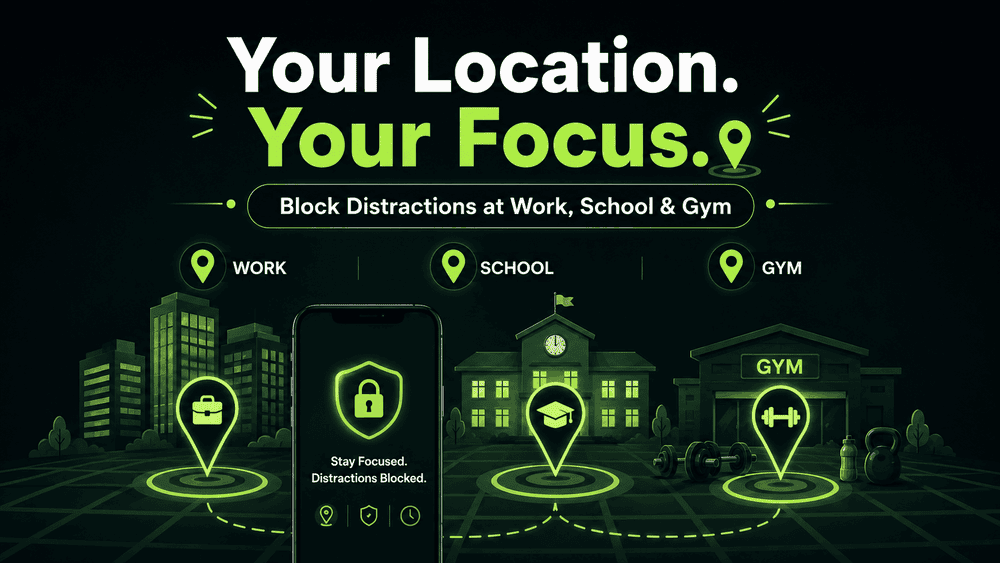
GPS Blocking feature lets you define a location zone on a map, your school, workplace, or gym, and choose which apps to block while you're in it, for whichever days you set. Apps block automatically when you enter the zone and unblock when you leave, so there's nothing to remember to turn on or off. What sets it apart from a standalone geofencing tool is that it sits alongside Jolt's other enforcement features, Sessions for time-based schedules, Focus Session for on-demand blocking, and Duration/Open Limits for capping specific apps, so you're not stuck choosing between location-based rules and every other kind of blocking.
Best for: people who want one system that handles location, schedule, and daily caps together, rather than a single-purpose location tool.
2. AppBlock: best for Android users who want location or Wi-Fi triggers specifically
AppBlock is one of the few mainstream blockers built with location and Wi-Fi-based triggers as a core, prominent feature. You can set blocks to activate automatically based on GPS location or a connected Wi-Fi network, which makes it a natural fit for office settings (“block social apps whenever I'm on the office Wi-Fi”). It runs on Android and iOS, with a free tier and a paid tier for more advanced rules.
Best for: Android users who specifically want Wi-Fi-network-based triggers in addition to GPS, not just location**.**
3. GymLock: best if the gym is your one specific problem zone
GymLock is built around a single use case: locking distracting apps automatically the moment you walk into your gym, using location detection to turn your gym into a dedicated “Focus Zone.” You choose which apps get locked, and it's designed specifically around workout sessions rather than general productivity.
Best for: people whose only real distraction problem is scrolling between sets, not a broader work or school need.
4. Life360 / family geofencing apps: worth knowing about, but a different category
Family safety apps like Life360 use geofencing to alert parents when a child arrives at or leaves a place like school or home, and some family-monitoring apps bundle in screen-time and app-blocking controls alongside that location tracking. These aren't self-directed distraction blockers in the way the apps above are; they're built for a parent managing a child's device, not an adult managing their own. Worth knowing about if your “location-based blocking” need is actually a parenting need, but not a fit if you're looking to manage your own distractions.
Best for: parents who want location alerts and screen-time controls on a child's device, not personal use.
5. Tasker (Android): best for people who want to build their own rules
Tasker is a general Android automation app, not an app blocker by default, but its geofencing triggers can be combined with other automation actions to build a custom “block these apps in this location” rule from scratch. It takes real setup time and technical comfort, and it won't hold up against someone determined to just turn the automation off, but it's a flexible option for anyone who wants full control over the logic.
Best for: technically comfortable Android users who want to build a fully custom rule rather than use a pre-built one.
What most general-purpose blockers get wrong here
It's worth noting plainly: several of the most popular screen-time and blocking apps, including some of the biggest names in the category, are built primarily around time-based sessions and don't offer true location-based triggers at all. If location is specifically what you're after, it's worth confirming that feature exists in an app before assuming a well-known name automatically covers it.
FAQ
What's the difference between a scheduled block and a location-based block?
A scheduled block activates based on the time of day, regardless of where you are. A location-based block activates based on where you physically are, regardless of the time, useful when your risk of distraction is tied to a place rather than a fixed clock.
Do most popular app blockers support location-based triggers?
Not all of them; some of the most well-known screen-time and blocking apps are built primarily around scheduled sessions rather than location. It's worth checking specifically for a GPS or Wi-Fi trigger feature rather than assuming it's included.
Is a location-based blocker better than a scheduled one?
Neither is universally better; it depends on whether your distraction risk is tied more to a place (classroom, gym, office) or a time window (work hours, evening). Some tools, including Jolt, let you combine both approaches rather than choosing one.
Can location-based blocking drain my phone's battery?
GPS-based features do use some additional battery compared to no location tracking at all, though modern implementations are generally optimized to minimize this. If battery life is a major concern, it's worth checking how a specific app implements location detection before relying on it heavily.
Are location-based blockers only useful for students?
No, the same logic applies to any place-tied distraction, including an office, a gym, or a specific room at home used for focused work.
Ref

 Download Now
 Take charge of your time


 Twinkle