How Can Students Create a Balanced Study Routine With Screen Time Limits
Students can create a balanced study routine with
screen time limits by planning fixed study hours, setting clear goals, limiting distracting apps, using focus methods like Pomodoro, and tracking screen habits with productivity tools.
This approach improves focus, protects mental health, and helps students study effectively without digital overload.
Why a Balanced Study Routine Is Important for Students
Digital devices are now essential for education. Online classes, e-books, research platforms, and learning apps are part of everyday student life. However, excessive and unplanned screen use creates serious challenges.
According to a study published in The NIH, students who spend more than
7 hours per day on screens report higher levels of stress, anxiety, and reduced academic performance.
Another report by
ResearchGate highlights that unmanaged screen exposure affects attention span and sleep quality in students.
A balanced study routine with screen time limits helps students use technology with intention. Balance does not mean avoiding screens. It means controlling when, how, and why screens are used.
Understand Screen Time With Real Data
Before building a routine, students must understand their current habits. Research from
Exploding Topics shows that the average person checks their phone over 58 times a day, often without realizing it. For students, this habit breaks concentration and reduces learning efficiency.
Tracking tools and screen monitoring products provide clear data such as:
- Total daily screen time
- Time spent on learning apps versus entertainment
- Peak distraction hours
Awareness turns unconscious habits into conscious decisions, which is the foundation of productivity.
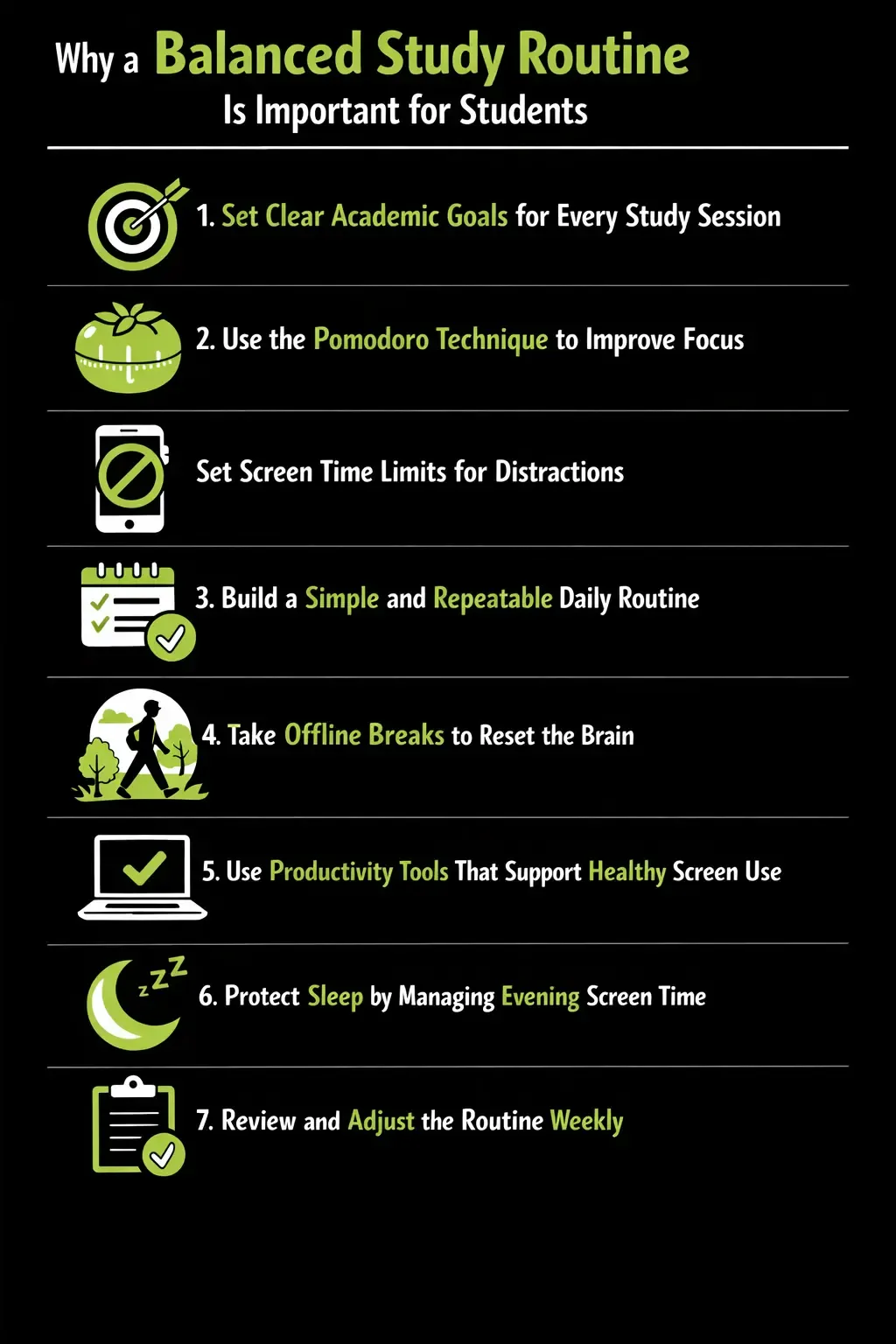
Set Clear Academic Goals for Every Study Session
Studying without a goal leads to multitasking. Multitasking feels productive but is not effective. A
Science Direct study found that multitasking students perform 40% worse on memory and comprehension tasks compared to focused learners.
Before starting any screen-based study session, students should define:
- The subject or topic
- The exact task to complete
- The time limit
Clear goals keep attention steady and reduce unnecessary screen switching.
Use the Pomodoro Technique to Improve Focus
The Pomodoro technique is one of the most researched focus methods. It supports deep work while preventing burnout.
The structure is simple:
- 25 minutes of focused study
- 5 minutes of rest
- Repeat four cycles
- Take a longer break
A study published in the
American Psychological Association shows that short, timed study sessions improve information retention and reduce mental fatigue. Pomodoro also supports screen limits by creating natural stopping points.
Many productivity tools include Pomodoro timers, making it easier for students to maintain discipline without stress.
Set Screen Time Limits for Distractions
Not all screen time contributes to learning. Social media platforms are designed to capture attention. According to a report by
Yale Daily News, students lose an average of 2 hours per study day due to digital distractions.
To protect focus, students should:
- Limit social and entertainment apps during study hours
- Use app blockers for fixed periods
- Allow access only during planned breaks
Screen control products help automate this process. Automation reduces willpower fatigue and supports long-term habit building.
Build a Simple and Repeatable Daily Routine
Consistency improves results. A structured routine trains the brain to focus at specific times.
An effective routine includes:
- Fixed study blocks
- Short breaks between sessions
- Screen-free time in the evening
- Time for rest and offline activities
Research from the
NIH shows that students with consistent study routines perform better academically than those who study irregularly, even if total study hours are the same.
Routine creates balance and protects mental energy.
Take Offline Breaks to Reset the Brain
Breaks are essential, but screen-based breaks are not always restful. A study by the
University Behavioural Centre confirms that continuous screen exposure increases mental exhaustion.
Better break activities include:
- Walking or light movement
- Stretching
- Deep breathing
- Drinking water
These activities refresh attention and restore energy faster than scrolling.
Use Productivity Tools That Support Healthy Screen Use
Modern productivity products are designed to support focus, not restrict learning. These tools help students:
- Schedule focus sessions
- Monitor study progress
- Reduce impulsive screen use
- Build long-term discipline
Tools that use positive reinforcement are more effective than strict controls. According to
ResearchGate, habit-based systems improve adherence by up to 60% compared to forced restrictions.
Protect Sleep by Managing Evening Screen Time
Sleep is critical for learning. Research from the
Oxford Academics shows that students who use screens late at night experience lower memory retention and slower reaction times.
Students should:
- Stop non-essential screen use one hour before sleep
- Use night or focus modes
- Keep devices away from the bed
Good sleep strengthens memory, emotional balance, and academic performance.
Review and Adjust the Routine Weekly
A routine should evolve. Subjects change. Academic pressure changes. Weekly reflection helps students stay aligned.
Once a week, students should:
- Review screen time data
- Check goal completion
- Adjust limits and schedules
This reflection ensures the routine remains realistic and effective.
How Jolt Helps Students Build a Balanced Study Routine
Modern studies show that students lose focus quickly when distractions are not controlled. Research from the
Idea To Value found that it takes 23 minutes on average to regain focus after a digital interruption. This is where structured productivity tools make a real difference.
Jolt is designed to help students follow a balanced study routine with screen time limits by combining focus sessions, app blocking, and habit-based guidance.
Data from digital wellbeing research shows that users who actively limit distractions can improve task completion rates by up to 35% and reduce unnecessary screen time by 30–40%.
| Feature | Impact on Students |
| Focus sessions | Improves concentration and study consistency |
| App blocking | Reduces distraction during study hours |
| Usage insights | Builds awareness and long-term balance |
By supporting intentional screen use, Jolt helps students study smarter, not longer.
Conclusion
A balanced study routine with screen time limits empowers students to learn better without digital burnout.
By combining goal-setting, Pomodoro-based focus sessions, structured routines, and smart productivity tools, students can achieve higher productivity while maintaining mental balance.
Jolt support this approach by helping students transform screen use into a focused, intentional, and healthy study experience.
Frequently Asked Questions
- What is a balanced study routine with screen time limits?
A balanced study routine with screen time limits is a planned approach where students divide time between focused study, breaks, and rest while controlling non-essential screen use. It helps students stay productive, avoid distraction, and maintain mental and physical balance.
- How much screen time is healthy for students during study days?
Studies suggest that students should limit non-academic screen time to 2–3 hours per day. Educational screen use should be structured with breaks. Short, focused sessions are more effective than long, unplanned screen exposure.
- Why does limiting screen time improve productivity?
Limiting screen time reduces distractions such as notifications and app switching. Research shows that fewer interruptions improve concentration, memory retention, and task completion, leading to higher overall productivity during study hours.
- How does the Pomodoro technique support better study habits?
The Pomodoro technique breaks study time into short sessions with regular breaks. This method prevents mental fatigue, improves focus, and makes it easier to manage screen use without feeling overwhelmed or stressed.
- Can digital tools really help students manage screen time?
Yes. Productivity tools help students track screen habits, block distracting apps, and create focus sessions. When used consistently, these tools support discipline, improve study balance, and help students build long-term healthy screen habits.

 Download Now
 Take charge of your time