Open Limit: The App That Blocks Your Apps When You've Had Enough
5-minute read
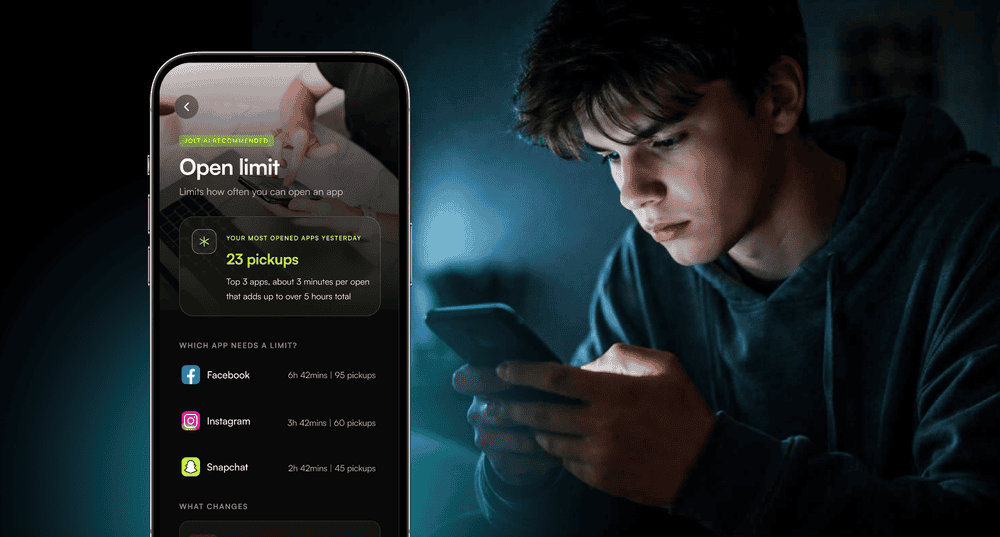
Overview: Open Limit limits how frequently you open the app, not how long you scroll. Pick Instagram, Snapchat, TikTok, or Twitter, set a daily open count, and once you hit zero, the app locks for the day. Every reflex check now comes with a real cost.
The Problem Isn't Duration — It's Frequency
Most screen-time tools count minutes. Open Limit counts something more honest: how many times you reach for an app in the first place. Phone habits rarely show up as one long binge, they show up as dozens of tiny, unconscious check-ins scattered across the day. You open Instagram for "just a second," see nothing new, close it, and repeat that thirty seconds later. Multiply that by fifty times a day, and hours vanish without a single session ever feeling long.
This is the reflex open, the muscle-memory tap that happens before your brain registers a decision. Time limits don't touch it, because each session is already short. Open Limit targets the count, which is exactly where the real damage happens.
How Open Limit Works?
- Pick an app — Instagram, TikTok, Twitter, or any habit-forming app.
- Select a difficulty mode — Easy, Medium, or Hard.
- Set a daily open count — say, 5 opens of Instagram per day.
- Watch the counter drop with every launch.
- Hit zero, and the app locks for the rest of the day. No extensions, no snoozing.
Setup takes under a minute, but the psychological effect is significant. When you know you have only five chances to open an app, each one carries weight. You stop opening it out of boredom and start asking: do I actually want this right now? That pause is often enough to break the loop.
Why Cutting Frequency Beats Cutting Time?
Traditional limits cap total minutes but don't stop the compulsive reach, you can still open an app forty times, just briefly. Open Limit puts a hard price on every single open instead. Set Instagram to five opens a day, and the shift is immediate: you stop checking between tasks out of habit and start saving opens for moments that matter. The app doesn't vanish from your life; it just stops running on autopilot.
Conclusion:
Open Limit isn't about quitting your favorite apps; it's about reclaiming the choice to use them. By capping opens instead of minutes, it interrupts the reflex before it becomes a loop, leaving you with fewer wasted glances and a phone that finally waits for you to decide.
FAQs
Will Open Limit stop me from using an app in emergencies?
Open Limit is designed to curb compulsive, low-value checking, not to block genuinely important use. Most versions of this kind of tool allow some flexibility in setup, so you can choose a difficulty mode and open count that still leaves room for real needs.
What's the difference between Easy, Medium, and Hard modes?
These modes typically control how strictly the lock is enforced once you hit your daily limit, for example, how hard it is to bypass, delay, or override the block for that app.
Can I apply Open Limit to more than one app at a time?
Yes, you can set individual open counts for different apps, such as 5 opens for Instagram and 3 for Twitter, letting you tailor limits to whichever apps trigger your reflex-checking the most.

 Download Now
 Take charge of your time