How to Monitor Screen Time at Work: Tools, Tips & Best Practices
Monitoring screen time at work is becoming essential for better productivity and employee wellbeing. Studies reveal that workers can lose up to
3 hours daily to distractions, with average screen time often
exceeding 7 hours. Using the right tools and best practices to track screen use and manage distractions can markedly improve focus and work output.
Screen time monitoring apps for work capture how employees spend time on their devices, tracking apps, websites, and active computer time.
- Detailed reports on app usage and web browsing
- Real-time dashboards showing active and idle times
- Ability to set productive vs distracting app categories
- Screenshots or activity snapshots (with privacy protections)
- Alerts for excessive non-work activity
These tools support desktop and mobile platforms, syncing data to give managers clear insights into work habits. When used transparently and thoughtfully, they help employers understand work patterns without invading privacy.
Monitoring screen time at work is very important to improve productivity and focus. Most modern smartphones include useful built-in tools to help you track and
manage screen time without needing extra apps. Each tool offers different features to help users understand and control how they use their devices.
Built-in Screen Time Tools You Can Find on Your Phone
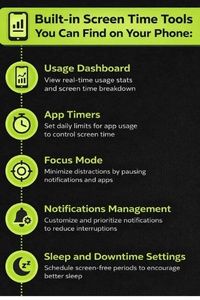
- Usage Dashboard: A usage dashboard shows you how much time you spend on each app and activity per day or week. It displays data in charts and graphs, giving you an easy overview of your phone habits. This helps identify time-consuming apps and highlights where to focus on reduction.
- App Timers: App timers let you set daily limits on how long you can open specific apps. Once the timer is reached, the app is paused or blocked for the rest of the day. This is a simple way to stop mindless scrolling and keep distractions in check.
- Focus Mode: Focus mode allows you to temporarily pause distracting apps during important work sessions. You define which apps to block and when. This helps create dedicated “focus blocks” that protect uninterrupted productivity.
- Notifications Management: Many phones let you customize notification settings, so you only get alerts from essential apps during work hours. Reducing non-urgent notifications lowers interruptions and cognitive load, helping maintain concentration.
- Sleep and Downtime Settings: Sleep or downtime features reduce phone activity during set hours, such as nighttime. They dim the screen, silence notifications, and limit app access to improve rest. Better sleep supports sharper focus and better decision-making during the day.
Using these built-in tools helps raise awareness about your screen use and supports healthier habits without needing third-party apps. By combining app limits, focus modes, and notification controls, you can effectively monitor and reduce screen time for better work output.
Tips for Effective Screen Time Monitoring
Simply tracking screen time is not enough. To get the most benefit and boost work quality:
- Set clear goals: Define what productive and unproductive screen use means for your team. Automate alerts for repetitive distractions like social media or streaming sites.
- Communicate openly: Explain to employees why monitoring is in place to improve efficiency and support mental health, not to micromanage or spy.
- Encourage breaks: Use monitoring insights to prompt regular short breaks, which reduce eye strain, fatigue, and burnout.
- Prioritize focus sessions: Schedule concentrated work blocks where distractions are minimized by blocking non-essential apps.
- Review data regularly: Managers and employees should review screen time reports together, identifying patterns and improving work habits collaboratively.
Best Practices for Screen Time Monitoring for Employees
Screen time monitoring should balance productivity with privacy and employee trust. Best practices include:
- Use monitoring tools only during work hours and with employee consent.
- Avoid invasive features like keystroke logging or video recording unless absolutely needed.
- Share productivity tips alongside reports and celebrate improvements.
- Allow employees control over some tracking features, like pausing for breaks or marking tasks as non-screen time.
- Train teams on digital wellbeing to build awareness around healthy screen habits.
Benefits of Monitoring Screen Time at Work
When done right, screen time monitoring helps businesses:
- Increase employee productivity by up to 15% through better distraction management.
- Identify workflow bottlenecks and optimize task allocation.
- Reduce burnout by enforcing break schedules.
- Enhance employee self-awareness and accountability.
- Support remote and hybrid teams with clear data on work activity patterns.
Conclusion
Monitoring screen time at work is a strategic step to improve productivity and worker wellbeing. Using dedicated screen time monitoring apps with clear, respectful policies enables teams to manage distractions, focus deeply, and maintain balance during work hours. Tools offering app blocking, focus sessions, and detailed usage analytics, like the features available in Jolt, can simplify this process and help build better screen habits for sustained results.
Frequently Asked Questions
- How can I monitor screen time at work without invading privacy?
You can use built-in phone and computer tools that show app usage and active time without recording keystrokes or sensitive data. Communicate openly with employees about tracking goals and limit monitoring to work hours. Choose software that respects privacy by offering options like blurred screenshots or no video capture.
- What are simple ways to reduce screen time distractions during work?
Set app limits on social media and entertainment apps, use focus modes to block distracting notifications, and schedule focused work blocks. Turning off non-essential notifications during work hours also reduces interruptions. Regular short breaks help refresh the brain and avoid burnout.
- Do screen time monitoring tools help improve productivity?
Yes. Studies show employees who use time tracking and screen monitoring tools report up to 15% gains in productivity. These tools reveal distraction patterns, help prioritize tasks, and promote accountability and better work habits.
- Can I monitor screen time across multiple devices?
Many screen time tools sync data across smartphones, tablets, and computers to give a complete picture. This helps managers track overall work activity regardless of device used, and employees get consolidated reports of their usage.
- How do focus sessions work in screen time tools?
Focus sessions create timed work intervals during which distracting apps are temporarily blocked. This helps build deep concentration by reducing multitasking and digital interruptions. Users can customize session lengths and set break reminders for better work rhythm.

 Download Now
 Take charge of your time




 Twinkle

