7 Best Screen Time Management Apps in 2026 That Actually Work
The need for these tools is growing.
The World Health Organization found that problematic social media use among adolescents increased from 7% in 2018 to 11% in 2022. The study covered almost 280,000 young people across 44 countries and regions.
Here are seven screen-time apps that offer practical controls instead of basic reminders.
7 Best Screen Time Management Apps in 2026 That Deliver Real Results
1. Jolt
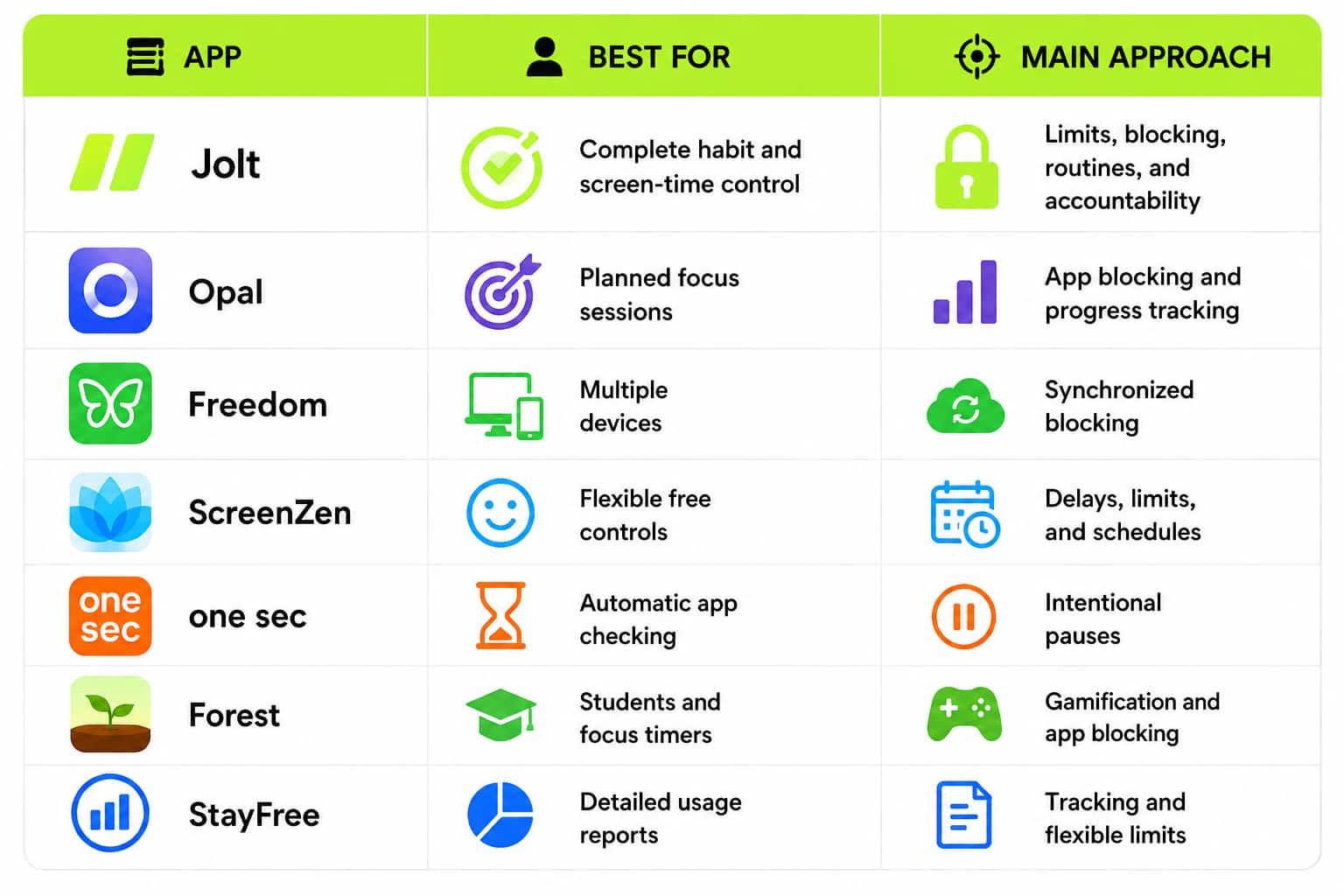
Jolt App stands as the Best Screen Time Management Apps because it addresses several types of phone habits. It does not rely on a single timer. Users can control when, where, how often, and for how long they access distracting apps.
Key features
- Sessions: Users can choose apps, select certain days, and create repeating blocking schedules. A Session can block social media during office hours, study periods, meals, or family time.
- Open Limit: This controls how many times an app can be opened each day. After the selected number is reached, access is blocked until the next day. It is useful for people who open Instagram, YouTube, or X without thinking.
- Duration Limit: Users can give an app a daily time budget. The limit can range from 15 minutes to six hours. Once the time is used, the app remains blocked for the day.
- Focus Session: This is an instant focus timer for urgent work. Users choose the duration and blocked apps, and they can also hide app icons or play focus music.
- Sleep Schedule: Selected apps can be restricted before bedtime and after waking. Essential tools such as alarms, messages, meditation apps, and emergency contacts can stay available.
- GPS Blocking: Rules can start automatically when the user enters a workplace, college, gym, library, or another selected location.
- Good Apps First: Distracting apps remain locked until the user completes a set amount of time in productive apps, such as a learning, meditation, or fitness app.
- Accountability Partner: A trusted person can approve or reject requests to weaken certain restrictions. This makes impulsive rule-breaking harder.
How to use it effectively
This combination makes it useful for people who regularly ignore normal screen-time warnings.
2. Opal
Opal is designed for people who want to plan distraction-free periods and measure their progress. It lets users block selected apps on phones and computers and create scheduled or immediate focus sessions.
Key features
- Users can create repeating Sessions for work, study, or sleep.
- The Focus Timer starts a blocking period whenever concentration is needed.
- App groups make it easier to block several distractions together.
- Progress tools show how focus habits change over time.
- Stricter blocking options can make a Session harder to leave early.
Best way to use it
Create one morning Session for deep work and another evening Session for reading or sleep. Opal works well for
professionals who prefer a polished interface and clear progress tracking.
3. Freedom
Freedom is a great option for people who switch between a phone, laptop, and desktop. One account can block distractions across Mac, Windows, iOS, Android, and Chrome.
Key features
- It can block websites, mobile apps, desktop programs, or the internet.
- Blocking Sessions can run across several connected devices.
- Users can start a Session immediately or schedule it in advance.
- Recurring blocks can protect regular work or study hours.
- Locked Mode helps prevent users from changing an active Session.
- Website exceptions allow necessary resources to remain available on supported desktop systems.
Best way to use it
Block social media on your phone and news, email, or entertainment websites on your computer during the same work period. It is especially useful when removing one distraction simply makes you open it on another device.
4. ScreenZen
ScreenZen uses small barriers to stop mindless scrolling. It is donation-supported and does not require a standard subscription for its main screen-time tools.
Key features
- A short pause can appear before a distracting app opens.
- Users can limit how many times an app is opened.
- Daily time limits can control total usage.
- Schedules can make apps available only during selected periods.
- Different rules can be applied to different apps and websites.
- Users can receive a reminder about their reason for opening an app.
Best way to use it
Add a pause before social media and allow only a few visits each day. This approach reduces casual checking while keeping access available when it is genuinely needed.
5. One Sec
One sec focuses on the moment between tapping an app and entering it. It inserts a brief activity, such as breathing, reflection, rotating the phone, or typing text. This interruption gives the user time to reconsider the action.
The method has research support. A peer-reviewed study published in
PNAS found that the intervention reduced openings of selected apps by 57% after six weeks.
Key features
- Intentional pauses interrupt automatic app opening.
- Users can block apps or websites at scheduled times.
- Time limits can stop long scrolling sessions.
- Intention tracking asks why the user wants to open an app.
- Healthy alternatives can redirect attention toward a better activity.
- Browser tools help control distractions on a computer.
Best way to use it
Apply it to the two apps you open most often without a clear reason. It is one of the best screen time-reducing apps for breaking muscle-memory habits.
6. Forest
Forest turns focused time into a visual reward. A virtual tree grows while the user stays focused. Leaving the Session or opening a blocked app can cause the tree to wither.
Key features
- Focus timers support study and Pomodoro-style work.
- Deep Focus blocks selected distracting apps during a Session.
- Time Guard schedules blocks outside focus Sessions.
- Custom allowlists keep useful apps available.
- Group focus lets friends complete the same Session together.
- Statistics create a visual history of focused time.
- Earned coins can support real-world tree planting.
Best way to use it
Start a tree before a 30-minute study block and take a short break when it finishes. The visible reward can make regular focus timers feel less dull.
7. StayFree
StayFree is useful for people who want to understand their habits before setting strict rules. It provides cross-device reports, graphs, app limits, and website controls.
Key features
- Block Now immediately stops access to selected distractions.
- Scheduled Blocks restrict apps during fixed hours.
- Daily Limits control total use of an app, website, or category.
- Session Limits prevent a single visit from becoming too long.
- Cross-device statistics show where time is being spent.
- In-app blocking can hide distracting parts of social platforms without blocking the complete service.
Best way to use it
Review one week of data, identify the biggest time-consuming apps, and then create limits based on your real usage. This is helpful for users who want evidence before changing their routine.
How to Choose the Best App to Manage Screen Time
The best app to manage screen time depends on the habit causing the problem:
- Choose full blocking when you regularly ignore reminders.
- Choose open limits when automatic checking is the main issue.
- Choose time limits when short visits become long scrolling sessions.
- Choose cross-device blocking when distractions move between screens.
- Choose gamification when you need more motivation.
- Choose reports when you do not yet know where your time is going.
Conclusion
A
screen-time app works best when its controls match the user’s real behaviour. Start with one problem, such as late-night scrolling, constant app checking, or interruptions during work. For users who want scheduled blocks, open and
duration limits, instant focus,
sleep protection, location rules, accountability, and detailed insights in one system, Jolt provides the most complete option on this list.
Frequently Asked Questions:
- Do screen time management apps really work?
Yes, screen time management apps can reduce distractions when users set realistic limits, block problem apps, and follow consistent routines. They work best when matched to specific habits and goals.
- Is one screen time app suitable for every user?
No, one app is not best for everyone. The right choice depends on whether you need app blocking, usage reports, focus timers, sleep support, cross-device control, or daily habit support.
- Can Jolt help reduce social media use?
Yes, Jolt can help reduce social media use through Open Limits, Duration Limits, Sessions, Focus Sessions, Sleep Schedule, GPS Blocking, accountability tools, and detailed reports that support healthier daily habits.
- Can screen time apps completely replace self-discipline?
No, screen time apps do not replace self-discipline completely. They create useful barriers, reminders, and routines, but users still need clear goals and a willingness to follow them each day.
- Can screen time apps help improve sleep?
Yes, screen time apps can support better sleep by blocking distracting apps before bedtime and after waking. This reduces late-night scrolling and helps build a calmer routine and steadier mornings.

 Download Now
 Take charge of your time